GaussianThe AI Employee FirewallThe runtime security layer for the AI workforce.
Protect every AI agent running on employee devices before it can access sensitive data, execute risky actions, or create invisible security gaps.
AI agents can now:invoke MCP tools
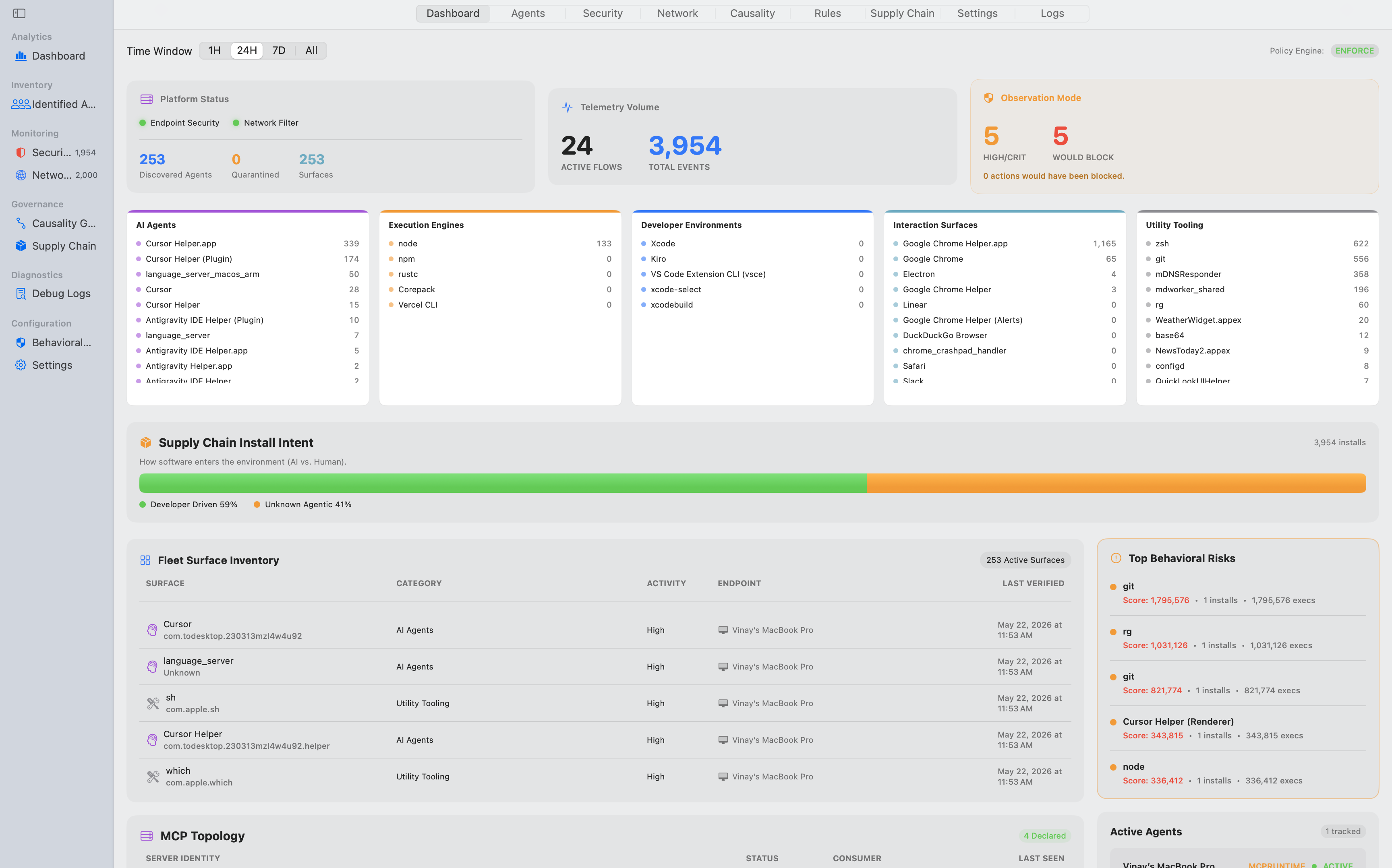
AI Agent Runtime Firewall
An AI Agent Runtime Firewall that discovers, monitors, and controls autonomous agents, MCP servers, skills, plugins, and AI-powered developer workflows before side effects occur.
The Problem
AI agents install tools, invoke MCP servers, and run skills.
Modern AI tools don’t just write code inside your editor.
They dynamically expand their capabilities.
- → Invoke local & remote MCP tools
- → Load skill packages (SKILL.md & rules)
- → Run terminal & helper scripts
- → Access local secrets & credentials
- → Exfiltrate data outbound
Static permission prompts and API gateways can’t keep up. The risk isn’t just what code is generated—it’s what tools and processes AI agents execute on your machines.
The Shift
From advisory configs to OS-level runtime truth.
Gaussian establishes the missing control plane: One security graph for everything your AI workforce installs, accesses, and executes.
AI AGENT SECURITY GRAPH · LIVE RUNTIME MAP
Interactive Capability & Execution Topology
Deterministic Governance Observatory
Constraining autonomous execution through layered deterministic governance. Watch real-time agent intents being evaluated against hard policy boundaries.
Gaussian Architecture
Real-time capability & execution control
Gaussian sits natively between AI clients, MCP tools, skill packages, and your operating system kernel.
Detect AI Capabilities
Automated discovery of AI client metadata, MCP servers (stdio, SSE, HTTP), and skill packages across endpoints.
Continuous asset inventory.
- + MCP servers (mcp.json)
- + Agent skills (SKILL.md)
- + Package manager installs
- + Local secret access
- + Outbound network egress
Live Execution Graph
See tool calls and capability invocations mapped in real time down to the process and network layer.
Zero logs lag. Real-time truth.
Inline Policy Mediation
If an action violates policy or introduces shadow risk, Gaussian intercepts before side effects occur.
Nothing proceeds without verdict.
Enterprise Compliance
Gaussian remembers approved execution patterns and streams zero-knowledge audit events to your SIEM.
SIEM export to Splunk & Datadog.
RUNTIME CAPABILITY CONTROL
AI Agent Runtime Security Platform
A runtime security platform for the next generation of AI-native endpoints.
MCP & Skill Inventory
Automated discovery of MCP servers (mcp.json), skill packages (SKILL.md & rules), and IDE extensions across Cursor, Claude, Windsurf, Zed, and VS Code.
✓ Discover AI Agents & Tools
Observed vs. Declared
Go beyond static permission lists. Correlate declared tool capabilities with real observed OS file reads, network calls, and command execution.
✓ Control Runtime Execution
Inline Action Firewall & DLP
Intercept tools/call invocations inline. Redact secrets in arguments, sanitize outputs, and block unapproved exfiltration paths before side effects happen.
✓ Prevent Data Leakage
Skill Supply Chain Protection
Audit embedded helper scripts (scripts/*.py, scripts/*.sh), hidden execution paths, and instruction-poisoning risks inside third-party agent skills.
✓ Secure MCPs & Agent Skills
ENTERPRISE AI AGENT SECURITY PLATFORM
AI Agent Governance Platform
Govern every AI agent, capability, permission, and action across your organization.
Why Gateways & Registries Aren't Enough
Marketplaces provide static discovery; gateways proxy remote network traffic. Gaussian adds what both miss: OS-level runtime authority and unified capability governance over local stdio tools, skill packages, and AI clients.
| Approach | Limitation |
|---|---|
| MCP Registries / Marketplaces | Discovery metadata only — no runtime enforcement, no local shadow discovery, no endpoint truth |
| MCP Gateways / Proxies | Requires artificial network routing — misses local stdio/IPC tools, shadow servers, and local SKILL.md packages |
| CASB & Traditional DLP | No concept of AI agent context, tool-use invocations, or agentic supply chains |
| Traditional EDR / XDR | Sees process activity — cannot map executions back to specific MCP tools, AI clients, or skill packages |
| Gaussian Platform | Combines endpoint EDR telemetry + MCP tool mediation + Skill inventory into one unified Capability Security Graph across your enterprise fleet. |
Protect Your AI Workforce Today
Get early access to Gaussian for macOS developer fleets. Deploy in under 2 minutes with zero workflow disruption.